
Choosing a Whisper serving framework: a 30-cell decision matrix
A 30-cell benchmark across HF, faster-whisper, vLLM, A100, L4, and concurrent load

Whisper is OpenAI’s open-source speech-to-text model. If you’ve used a meeting summarizer, voice assistant, or transcription tool in the last two years, there’s a good chance Whisper is doing the actual transcribing — even when the product doesn’t advertise it.
The catch: OpenAI’s API does not expose the newest Whisper-large-v3 checkpoint directly. If you want that model in production, you run it yourself.
Running it yourself means choosing a serving framework — the software layer between your app and the model. The main options are Hugging Face Transformers (the common Pytorch baseline), faster-whisper (a community-optimized version that runs the same model through a compiled C++ engine), and vLLM (a general-purpose serving engine originally built for large language models). Each one trades off speed, cost, and accuracy differently.
I needed to choose one for production. I run ML infrastructure at a healthtech startup where we transcribe clinical sessions into a structured medical-record system. Three things had to work at the same time:
Accuracy. A wrong word in a transcript is a wrong word in someone’s chart. We measure this with WER (word error rate) — the percentage of words the transcript gets wrong. Lower is better; published numbers for Whisper-large-v3 on clean speech are around 1-2%.
Cost. Hours of audio per provider per day across many providers adds up. A few cents per audio-hour becomes real money at scale.
Operational simplicity. When something breaks at 3am, I want to debug it without learning a brand-new system from scratch.
Most Whisper benchmarks I could find only measured one of those three at a time. So I built one that measured all three — across 3 frameworks, 2 GPUs, and 5 different concurrent-load levels. 30 test runs total.
What I found: the fastest framework processes audio about 285× faster than real-time — meaning it can transcribe an hour of audio in roughly 13 seconds — for less than half a cent per hour of compute. Its WER at that speed: 113%.
Yes, over 100%. That means the framework produces more wrong or fabricated words than the original audio contained. The fastest, cheapest configuration in my entire benchmark is unusable.
The cheapest setup that actually transcribes correctly turned out to be the most basic option: plain Hugging Face Transformers on a single NVIDIA L4 GPU — a $0.60/hour GPU you probably weren’t planning to use for production AI. The numbers:
Cost: 2.7 cents per audio-hour.
Accuracy: 1.44% WER (close to state-of-the-art for this dataset).
Cost and accuracy stayed flat across the tested concurrency range; latency did not.
The catch: response time gets slower as more users send requests simultaneously. One user gets a 30-second clip back in about 2 seconds. With 128 simultaneous users, the slowest request waits about 3.5 minutes — because every request has to get in line behind the ones in front of it on a single GPU.
Here’s what the field looks like at 8 concurrent users — a realistic load for a small SaaS product. Every framework × GPU combination, all six of them:
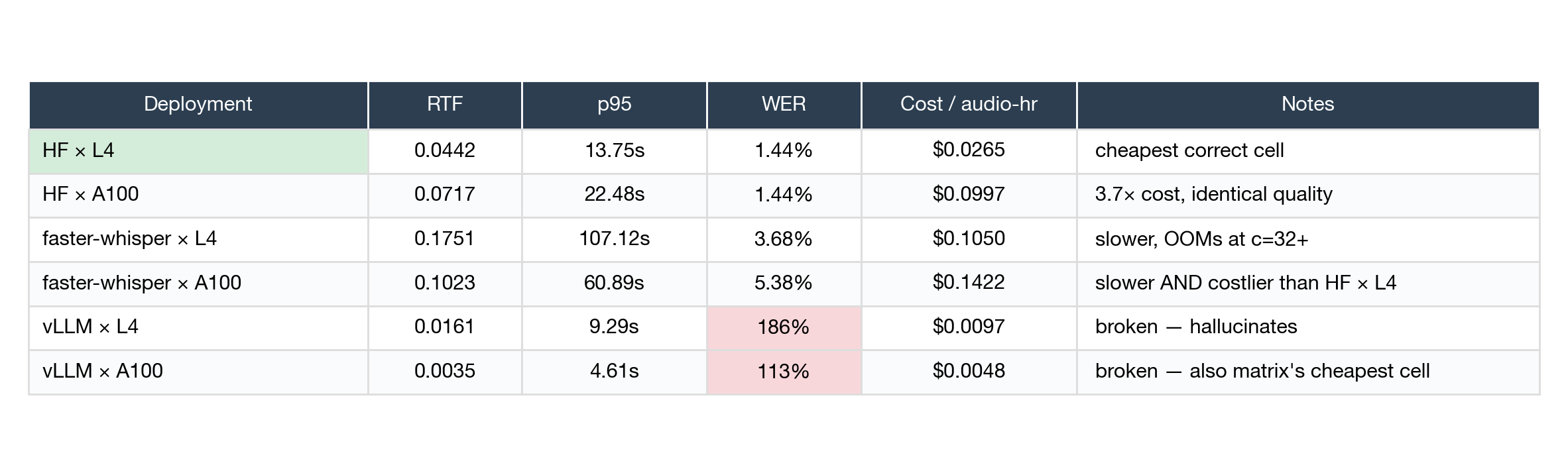
A quick note on the column names if any are new:
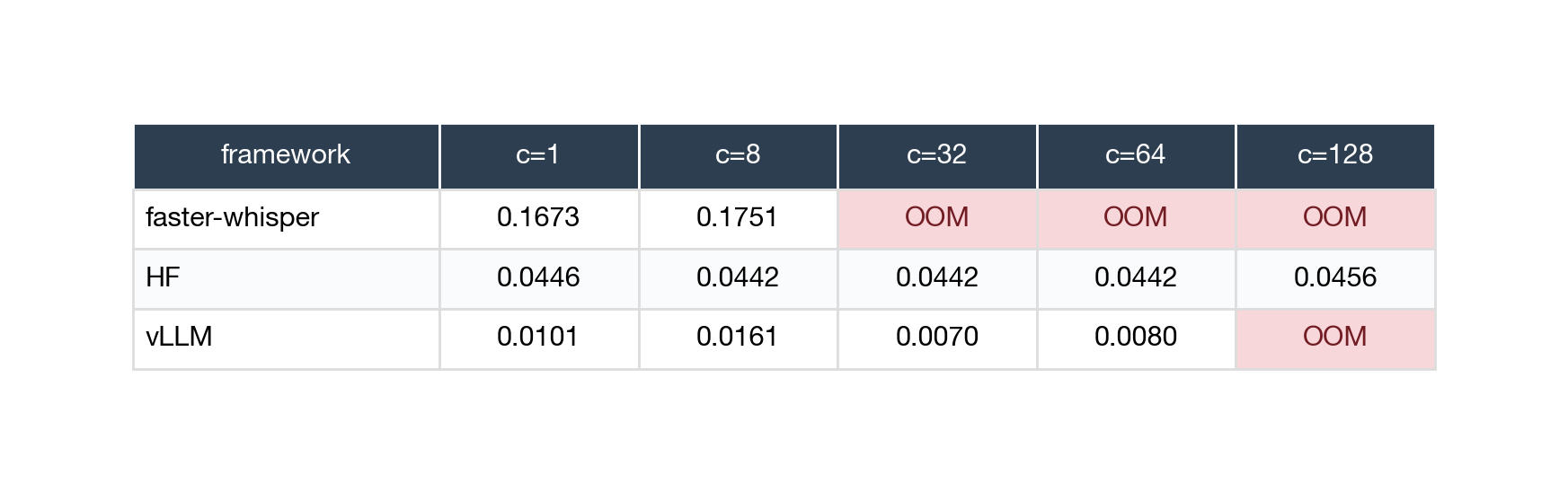
RTF (real-time factor) = how long it takes to process audio compared to the audio’s length. RTF 0.044 means processing 1 second of audio takes 0.044 seconds — about 22× faster than real-time. Lower is faster.
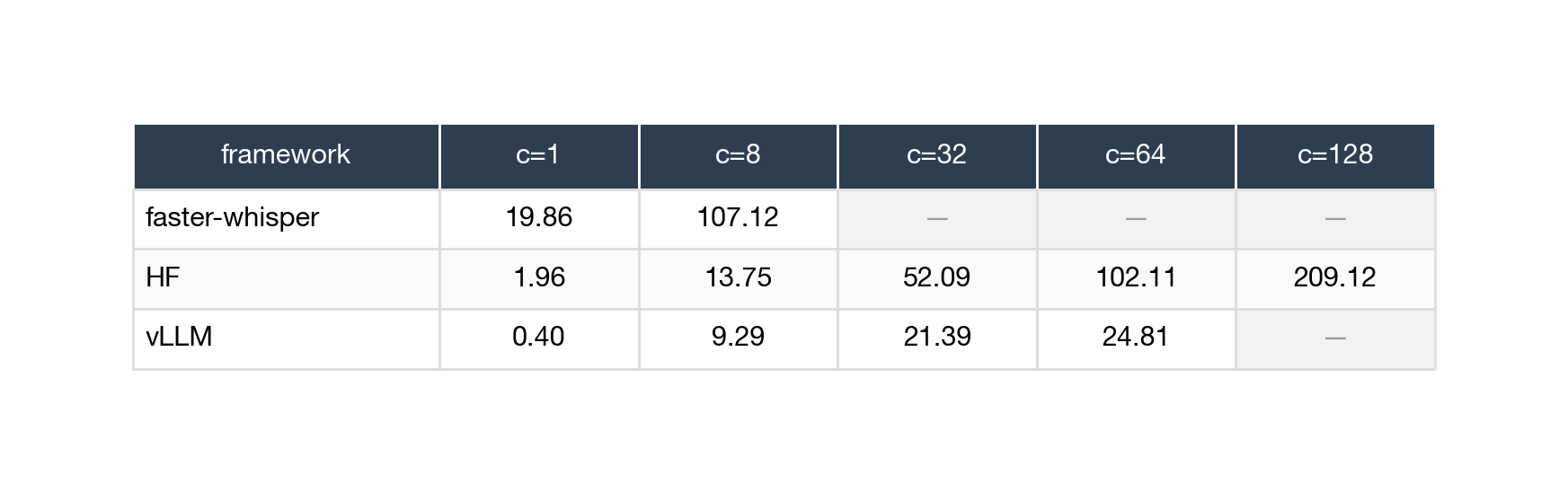
p95 = the wait time for the 95th-percentile slowest request. If p95 is 14 seconds, then 95% of requests come back faster than 14 seconds and 5% are slower.
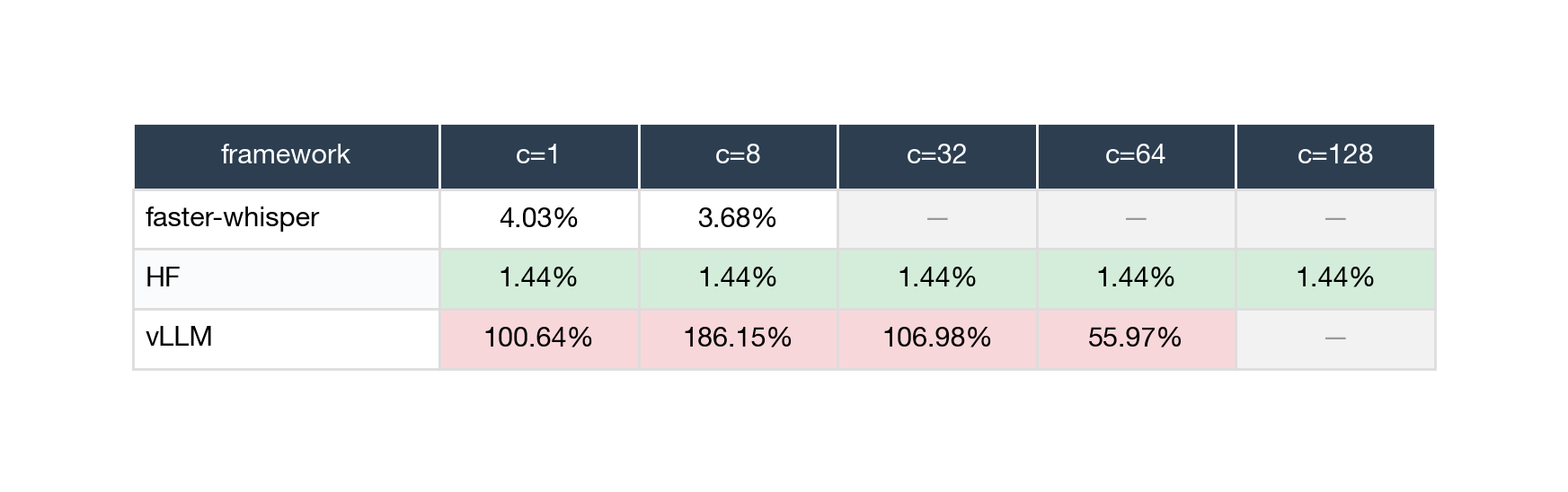
WER = word error rate (defined above).
A few things to notice:
In this v1 matrix, Plain HF on the cheap GPU wins on cost AND accuracy at the same time. That’s unusual — normally you pick one or the other. Here you don’t have to.
The vLLM rows are the spicy finding. vLLM × A100 is the cheapest cell in the entire matrix at $0.0048 per audio-hour — about half what HF × L4 costs. But its WER is 113% (more on what that means in Finding 1). It’s fast and cheap; it just doesn’t transcribe correctly. Don’t deploy it.
The expensive GPU doesn’t pay off (yet). An A100 costs about 2.5× more per hour than an L4. For the frameworks that handle one request at a time (HF and faster-whisper), the A100 is only ~2× faster — close, but not enough to make up for the higher hourly cost. The A100 only starts winning when a framework can process many requests together in parallel, which today only vLLM does — and vLLM is broken.
Two important caveats — and why I plan to redo parts of this analysis (v1.0.1):
⚠️ The HF × A100 numbers are contaminated. On RunPod (the cloud GPU service I used), the “private” GPU you rent actually shares a physical computer with other customers. When those other customers hammer the host CPU, your benchmark slows down — even though your GPU is fine. That’s what happened on the A100 host I got: my GPU was only 20-32% utilized (vs ~92% on the L4 host), meaning the GPU wasn’t even the bottleneck. On a clean A100 host, the HF × A100 numbers would be roughly half their current size. When RunPod inventory frees up, I’ll re-run on a less-busy host.
⚠️ HF and faster-whisper used different decoding strategies. Without getting too deep: HF uses greedy decoding (always pick the most likely next word). faster-whisper uses beam search with 5 beams (try 5 possible word sequences in parallel and pick the best). Beam search is typically more accurate but 3-5× slower per request. So a meaningful chunk of HF’s apparent speed advantage over faster-whisper is just the decoding choice, not the framework itself. If I run faster-whisper with greedy decoding too, it would probably win on speed. v1.0.1 will re-test that; the configs are already in the repo.
What these caveats don’t affect: vLLM’s bad transcripts (which fail regardless of host or decoding strategy). HF’s 1.44% WER (consistent across every test). The L4-vs-A100 cost story (depends on hourly rates and basic speed math, independent of these issues).
These numbers are at 8 concurrent users. For other load levels (1, 32, 64, 128), see the per-metric tables further down. The recommendation doesn’t change across the range — HF × L4 wins at every load on cost — but tail latency gets worse as load grows. Finding 2 explains why.
Why this benchmark exists
Most published Whisper benchmarks measure one of two things: raw model throughput on a single framework with no concurrent load, or a specific vendor’s serving stack on their preferred hardware. Neither answers the question production teams actually have: given my real workload — how many users, what latency budget, what cost ceiling — which framework will give me the best dollars-per-audio-hour without sacrificing accuracy?
This benchmark tries to answer that question. Three serving frameworks, two GPUs, five different concurrent-load levels, plus full raw data and a reproduction recipe so anyone can verify or extend it.
What I measured
Model: OpenAI Whisper-large-v3, the latest fully open-source Whisper. FP16 precision. English-only.
Eval audio: 50 audio clips, each about 30-46 seconds long (totaling ~30 minutes of audio). Built by concatenating adjacent utterances from the LibriSpeech audiobook corpus, which has free public ground-truth transcripts.
Frameworks: Hugging Face Transformers (the basic, official reference); faster-whisper (re-compiled in optimized C++); vLLM (a general-purpose serving engine with smart batching, but with a relatively new Whisper integration).
GPUs: NVIDIA A100 SXM4-80GB (
$1.49/hour, the heavy-duty option) and NVIDIA L4 24GB ($0.60/hour, the cost-effective option), both rented from RunPod.Concurrent load: 1, 8, 32, 64, and 128 simultaneous users sending requests.
Metrics: response time (median, 95th percentile, 99th percentile), throughput, accuracy (WER), GPU utilization, peak GPU memory, and cost per audio-hour.
30 total test cells (3 frameworks × 2 GPUs × 5 load levels). Each cell ran 10 warmup requests (excluded from results), then 3 full passes through the eval set. The reported numbers are medians across passes.
What I deliberately didn’t measure (and what’s coming)
Each item is a hook for a follow-up release:
Ray Serve and basic NVIDIA Triton. I originally planned to test 5 frameworks, but cut Ray Serve and basic Triton from v1 because they’re more about wrapping an inference engine than being one themselves. They’ll come back in later releases.
Triton with TensorRT-LLM. NVIDIA’s optimized engine for transformer models. The most likely candidate to fill the high-concurrency + tight-latency gap I describe in Finding 2. Coming in v1.1.
Smaller GPUs (T4) and CPU baselines. Answers “is a GPU even worth it for ASR?” — coming in v1.2.
Longer audio. I used 30-second-ish clips. Real workloads have hour-long meetings or podcast episodes; how each framework handles chunking matters. Coming in v2.
Smaller Whisper variants. distil-whisper and whisper-large-v3-turbo trade some accuracy for big speed gains. Coming in v2.1.
Bursty traffic. I tested steady concurrent load. Real production has spikes. Possibly v3.
The full data, by metric
Eight tables, one per metric per GPU. Skip to whichever section maps to your decision criteria.
NVIDIA A100 (premium GPU)
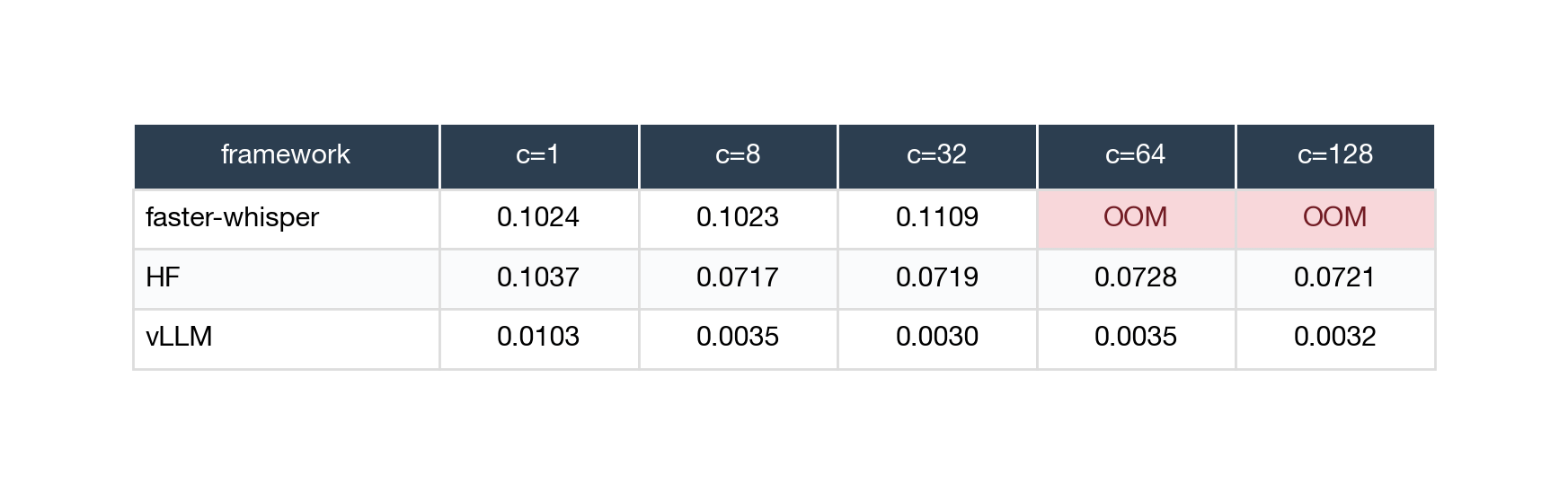
RTF (lower is faster)
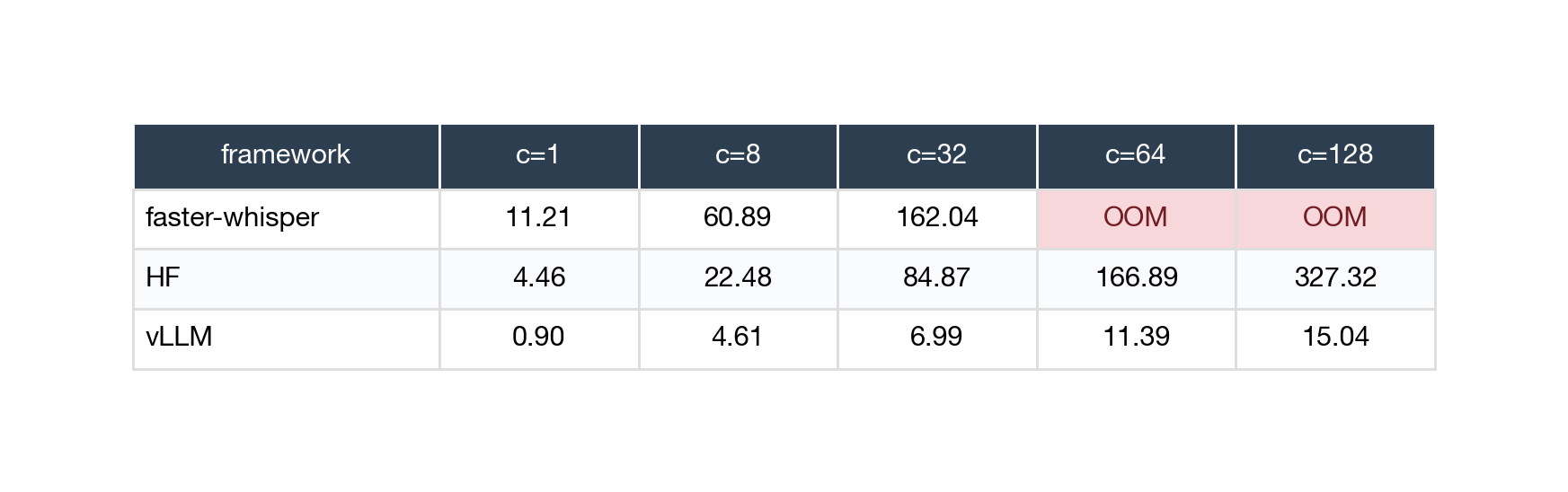
p95 latency (in seconds — the 95th-percentile slowest response)
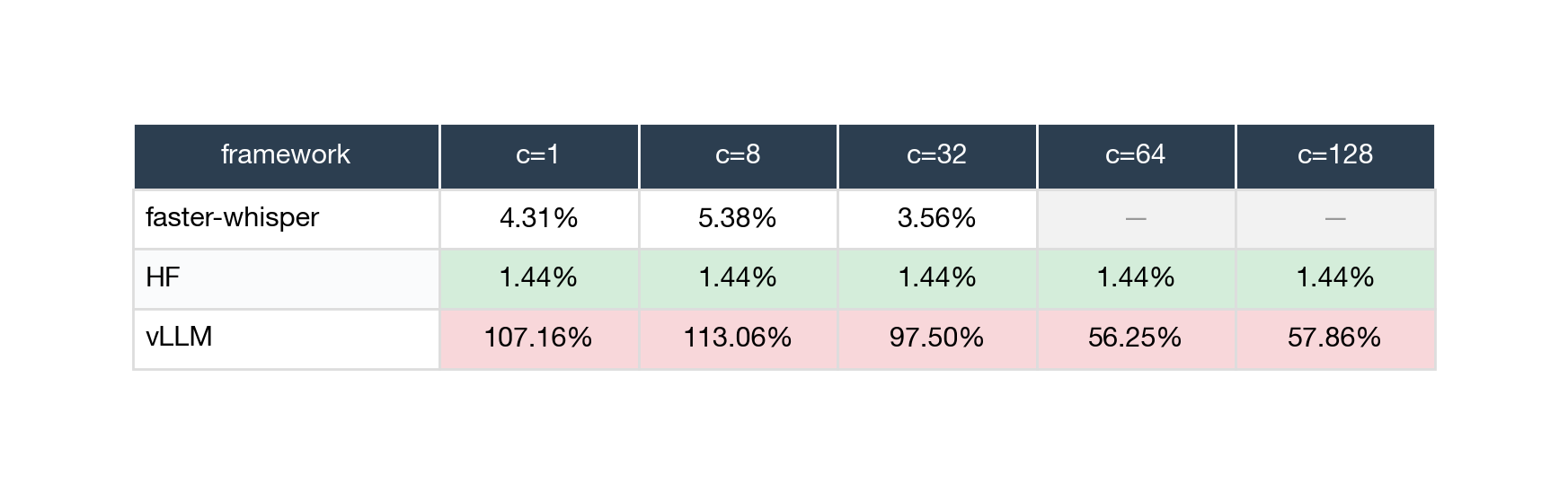
WER (over 100% means the framework fabricated more words than the audio contained)
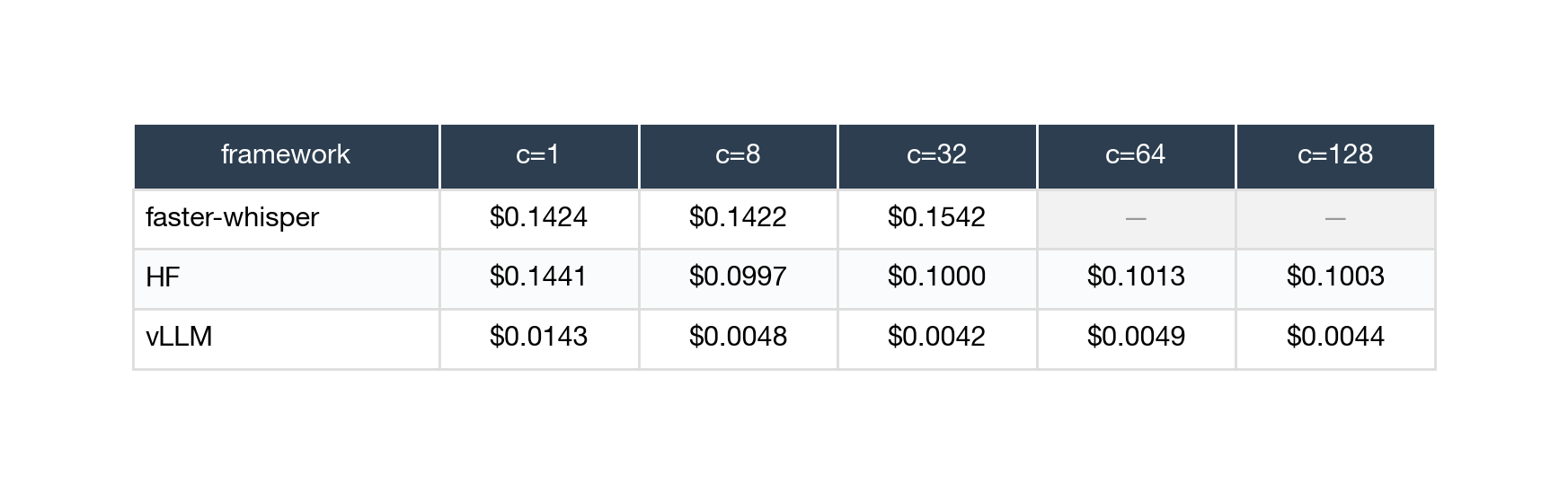
Cost (USD per hour of audio transcribed)
NVIDIA L4 (cost-effective GPU)
RTF
p95 latency
WER
Cost
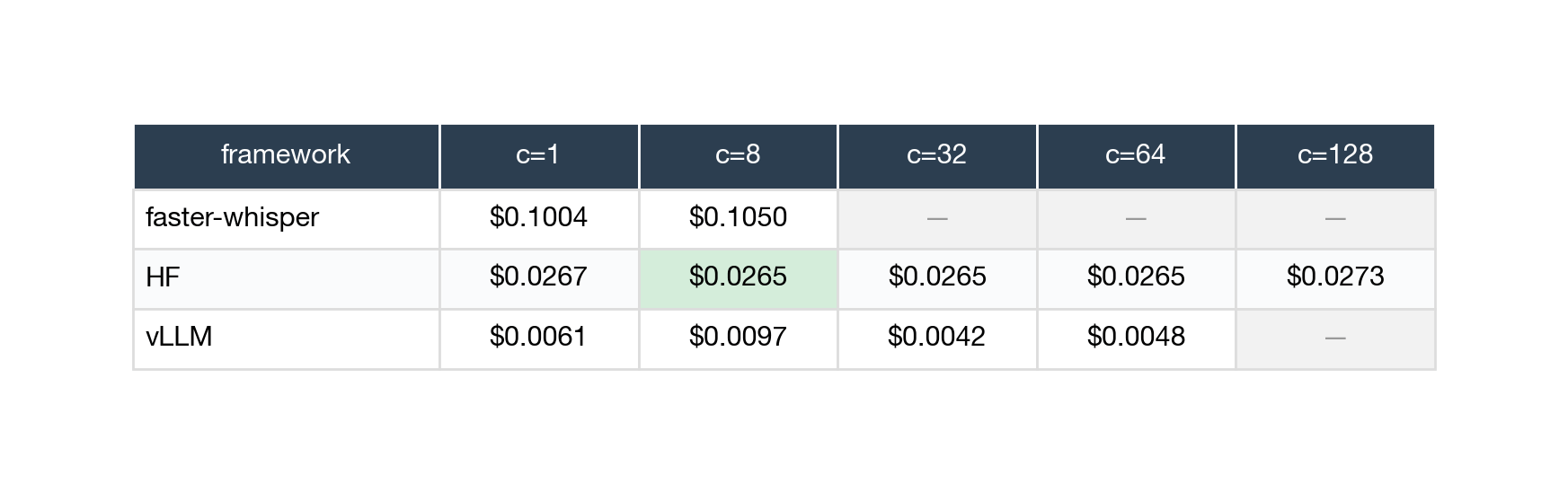
OOM in any table means “ran out of GPU memory” — faster-whisper × L4 hits this at 32 simultaneous users because the L4 only has 24 GB and each in-flight request claims some of that. vLLM × L4 hits it at 128 users. These aren’t omissions; they’re real findings about what each framework can structurally handle on each GPU.
Three findings worth screenshotting
Scope. Everything below applies to my specific test setup: one GPU at a time, steady concurrent load, 30-second-ish clips, on-demand RunPod pricing. Outside that — multi-server fleets, bursty traffic, true real-time streaming, sub-second latency requirements, hour-long audio — the answer might be different. I’ll flag where each finding could flip.
Finding 1: The fastest framework can’t actually transcribe.
vLLM is dramatically faster than the alternatives. At 8 concurrent users on an A100, it processes audio at 285× real-time for less than half a cent per audio-hour — about 30× cheaper than faster-whisper on the same hardware.
But its transcripts are wrong. Across every test cell, vLLM’s WER ranges from 50% to 186%. For comparison: HF Transformers transcribes the same audio at 1.4% WER, faster-whisper hits 3-5%. vLLM is getting more than half the words wrong.
Here’s why this happens. When OpenAI released Whisper, they shipped it with several safety checks built into the reference code. The model occasionally produces gibberish — that’s a known Whisper failure mode, especially on silence or background noise. To prevent that gibberish from reaching production, openai-whisper’s reference code does things like:
Detect when the model is “uncertain” and skip those sections
Spot repetitive-looking output (a common gibberish pattern) and retry with different settings
Score the model’s confidence and discard low-confidence chunks
Most production Whisper deployments inherit these checks (openai-whisper does, faster-whisper does, HF can be configured to). vLLM’s version of Whisper skipped them. Without those guardrails, when the model gets confused — or even just given silence — it produces fluent-sounding gibberish.
I tested three quick fixes before publishing. None of them worked:
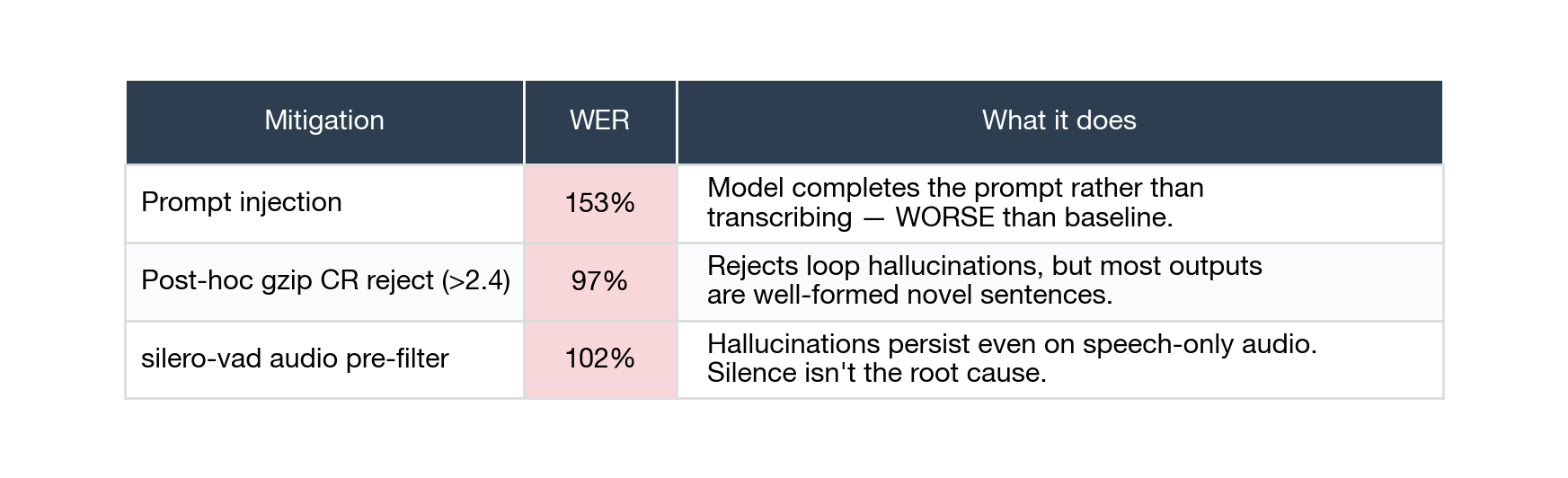
Looking at the actual transcripts makes the problem obvious:
Reference (what the audio actually said): “Concord returned to its place amidst the tents...” vLLM’s transcript: “Concerns and fears. By the time I was there I was already in the middle of the night and I was already feeling the heat of the night...”
These are perfectly coherent English sentences with nothing to do with the audio. The model is making things up. When I added a prompt to anchor the model, it just started completing the prompt instead. When I filtered out repetitive output, the gibberish came through anyway because it isn’t repetitive — it’s varied, well-formed novel sentences. When I stripped silence from the audio first, it didn’t help, because the gibberish appears on speech too.
The fix can’t come from outside vLLM. It needs to happen inside the engine itself — either fixing how audio is fed to the model, or adding back the safety checks that openai-whisper has. Until that lands, don’t use vLLM for Whisper, no matter how good the throughput numbers look. I’ll re-test as soon as upstream ships a fix.
Finding 2: The basic Hugging Face setup doesn’t scale up.
HF Transformers processes one request at a time on a single GPU. It can’t safely handle multiple requests in parallel — PyTorch’s generate() function isn’t built for that, and trying it actually corrupts the GPU’s state and crashes it. So when multiple users hit a basic HF deployment simultaneously, they line up behind each other.
The result: adding more concurrent users doesn’t get you more transcripts per hour. It just makes the wait longer.
The numbers show this clearly. At 1 user, a 30-second clip takes about 2 seconds to transcribe. At 8 simultaneous users, the worst-case wait is about 14 seconds. At 128 simultaneous users, the worst case is 3.5 minutes — because every request has to wait its turn behind 127 others.
This is exactly the problem that fancier serving frameworks are designed to solve. vLLM batches many requests into a single forward pass on the GPU, so they actually run in parallel. Ray Serve runs multiple copies of the model behind a load balancer, so users get spread across replicas. Both close the gap that HF leaves open. Neither is in v1 — vLLM is broken (Finding 1), Ray Serve is deferred to v1.2.
Faster-whisper has the same scaling problem in a milder form. It also processes one request at a time per GPU (the C++ engine underneath doesn’t batch across requests). So if you need to handle many simultaneous users on one GPU, neither HF nor faster-whisper is a long-term answer — you need a framework designed for batching.
Finding 3: The cheaper GPU wins on cost — but only because the frameworks can’t batch.
The cheapest correct cell in the whole benchmark is HF on a single L4: 2.65 cents per audio-hour at 1.44% WER. The same setup on the more expensive A100 costs 9.97 cents per audio-hour — almost 4× more — for identical quality. Faster-whisper shows the same pattern: ~10 cents on L4 vs ~14 cents on A100, both at similar accuracy.
Why? Quick math: cost-per-audio-hour = GPU’s hourly rate × how long it takes to process the audio. An L4 costs about $0.60/hour; an A100 costs about $1.49/hour. The A100 is roughly 2× faster per request than the L4 — but it’s 2.5× more expensive to rent. So the speed gain doesn’t quite cover the price gap, and you end up paying more per hour of audio.
This math flips the moment a framework can batch requests together. If a framework can process 8 requests in a single forward pass instead of 8 separate ones, the A100’s bigger memory lets it hold many more requests in flight at the same time. Now the higher hourly rate pays for itself — you transcribe many more hours of audio per hour of GPU rental.
The clearest example is vLLM. vLLM × A100 at 8 concurrent users is the single cheapest cell in the entire matrix at $0.0048 per audio-hour — half what vLLM × L4 costs, and 5× cheaper than HF × L4. The 80 GB A100 packs many more requests into each batch than the 24 GB L4 can. The hourly premium becomes a bargain.
The catch (from Finding 1) is that vLLM at that cell produces 113% WER — so this cheapest cell isn’t usable. But the cost pattern is real. v1.1 will test Triton + TensorRT-LLM, which keeps Whisper’s safety checks intact while also batching efficiently. I expect Triton × A100 to win on cost once it lands.
What this means for picking a GPU today:
If you’re using HF or faster-whisper (basic setups, one request at a time), use an L4. The expensive GPU isn’t worth it.
If you’re investing in a batched serving stack (vLLM eventually, or Triton + TensorRT-LLM soon), evaluate the A100. The cost story flips.
The L4-vs-A100 question depends on your framework choice, not on absolute hardware preference.
Should you self-host at all?
This benchmark answers “which self-hosted framework wins.” It doesn’t answer the more important prior question: should you self-host at all, or use a paid managed service?
For comparison, here’s roughly what managed speech-to-text services charge as of mid-2026:
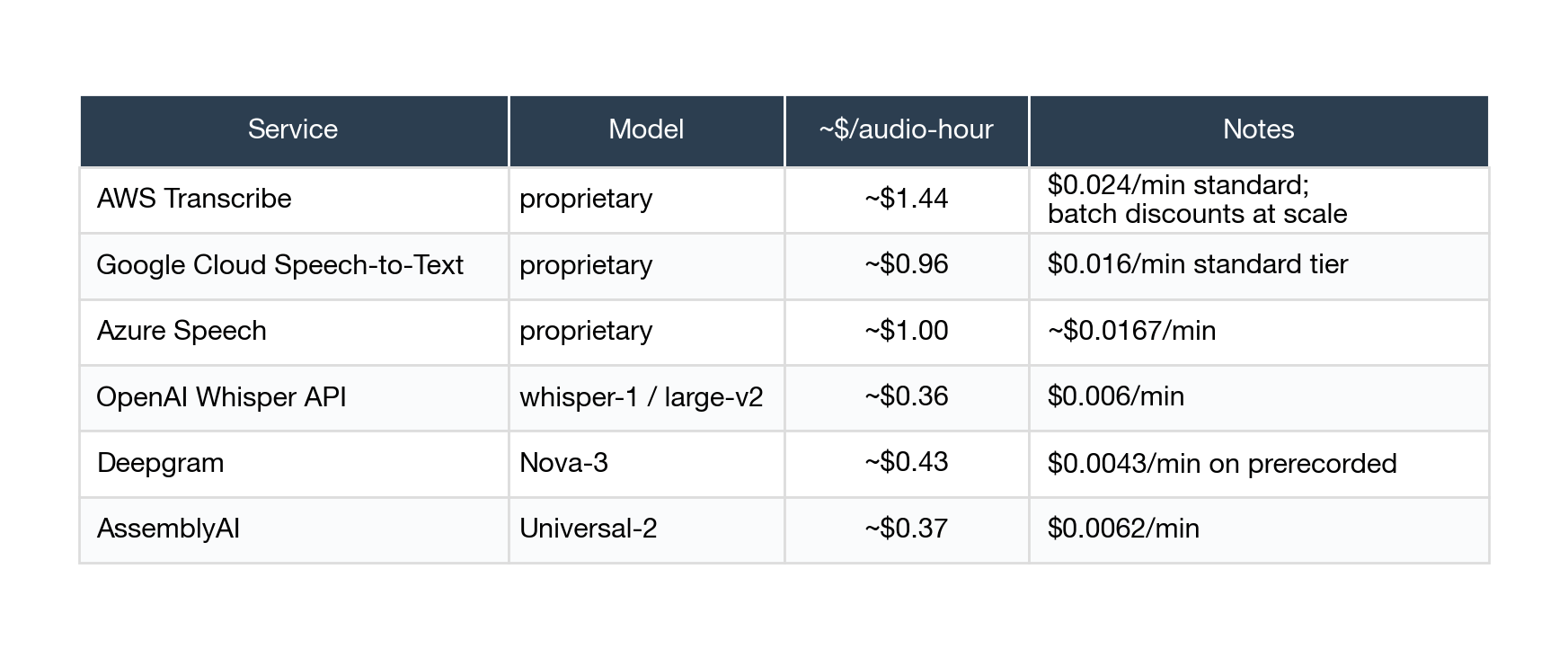
Compared to the cheapest self-hosted setup ($0.027/audio-hour), Deepgram and AssemblyAI are 13-16× more expensive, OpenAI’s Whisper API is 13× more expensive, and AWS Transcribe is 53× more expensive. On paper, self-hosting wins by an order of magnitude.
But the $/audio-hour comparison hides real things:
The self-hosted price is the best case. It assumes the GPU is 100% utilized — no idle time, no cold starts, no autoscaling friction. In real production with bursty traffic, a single L4 might only be 30-50% utilized on average, which doubles or triples your effective cost.
The self-hosted price doesn’t include engineering cost. Someone has to keep the deployment running — CUDA upgrades, framework version bumps, on-call rotation, monitoring. At small scale, that engineering time is the bigger line item.
Managed services bundle reliability and SLAs. Deepgram promises 99.9% uptime; a single self-hosted pod has whatever uptime your cloud provider gives you (in my experience: “varies”).
Some industries can’t use managed services at all. Healthtech, government, finance — anywhere data residency or HIPAA-like compliance matters — the audio can’t leave your VPC, even if managed would be cheaper.
My rule of thumb: self-host if you have either (a) high sustained volume that amortizes the engineering cost across many audio-hours, or (b) compliance requirements that take managed services off the table. Otherwise managed almost always wins on total cost of ownership.
Author’s note: this benchmark exists because of case (b). In our healthtech setup, clinician audio can’t leave the VPC, so managed services aren’t an option even when they’d be cheaper. Your situation may be different — and if neither (a) nor (b) applies, the right answer is probably a managed provider.
Methodology in 90 seconds
The four most-defensible measurement choices, in plain English:
I tested with steady concurrent users, not bursty traffic. Each “concurrent user” sends a request, waits for the response, then sends the next. This models “N active users using the system right now” reasonably well, though it doesn’t capture the spikiness of real production traffic.
I normalized transcripts before comparing them to references. Different frameworks output different punctuation, capitalization, and number formats. Without normalizing, I’d be measuring “does the framework spell out ‘four’ or write ‘4’” rather than “did it get the words right.” I used Whisper’s own built-in normalizer for consistency.
I excluded warmup runs. Every test cell first runs 10 throwaway requests to load the model into GPU memory and warm up caches. Those don’t count. Then I ran 3 full passes through the eval set and report the median.
Failures count. If a framework runs out of memory at 128 concurrent users, that’s a real finding, not an omission. Every test cell produces a results JSON even when things go wrong.
Full methodology details are in the GitHub repo’s docs/METHODOLOGY.md.
Two limitations worth flagging:
The HF × A100 wall-clock numbers are inflated by the host-CPU-contention issue I called out earlier. The relative pattern (HF is flat across concurrency, vLLM is fast but wrong, etc.) is still right — only the absolute numbers shift.
LibriSpeech audio is studio-quality audiobook narration. Real production speech is messier (accents, noise, overlapping speakers). The WER numbers here are sanity checks — “did the framework break the model?” — not predictions of accuracy on noisy real-world audio.
Reproduce it yourself
The full repo (code, data, methodology, raw per-cell JSONs, decision matrix): github.com/dyl5051/whisper-serving-bench
Every cell runs end-to-end inside a Docker container. The harness records git SHA, GPU model, driver version, hostname, Python version, and every per-request timestamp + transcript + reference. If your reproduction differs from mine by more than the standard deviation I report, please open an issue.
What’s next
v1.0.1 (target: as soon as RunPod CPU contention frees up): the two caveat re-runs from earlier — HF × A100 on a clean host, and faster-whisper at greedy decoding on both GPUs. Configs are already committed to the repo. ~$2 in compute.
v1.1 (target: 1-2 weeks): Triton + TensorRT-LLM. NVIDIA’s optimized serving stack — the most likely candidate to fill the “high concurrency + tight latency” gap that v1 can’t fill.
v1.2 (target: 2-3 weeks): Ray Serve + T4 + CPU baselines. Tests fleet-level scaling and answers “is a GPU even worth it for ASR?”
v2 (target: 4-6 weeks): Longer audio + variable input lengths + messier datasets (TED-LIUM, Common Voice).
v2.1: distil-whisper + whisper-large-v3-turbo — smaller, faster Whisper variants. The accuracy-vs-speed frontier across model sizes.
Each release gets its own writeup. Iterating in public on a tight cadence rather than dropping a finished artifact months from now.
Acknowledgments
This benchmark stands on the work of: the OpenAI Whisper paper authors and the original openai-whisper reference; Hugging Face Transformers for hosting the canonical PyTorch port; Guillaume Klein and the faster-whisper team for the CTranslate2 re-implementation; the vLLM team for the continuous-batching engine; and NVIDIA for the open Triton and TensorRT-LLM tooling coming in v1.1.
Repo: github.com/dyl5051/whisper-serving-bench
Corrections and reproductions welcome via GitHub issues — the artifact is the repo, not just this post.